Focussing
HomeFavoritesEquipmentTechniquesBooksTipsLinks
   

Polar Alignment
Focal Length
Focussing
Finding and Centering
Taking the Image
Dark and Flat Frames
Image Processing
Colour Imaging

Achieving accurate focus is critical to taking good CCD images.  Again, the flip mirror finder is very useful. The procedure described below achieves an accurate focus in just a few minutes.

  1. Centre the camera on a bright star as described in Finding and Centring an Object above.  Adjust the telescope focus until the star is well focused in the flip mirror eyepiece.  The telescope should now be close to the camera focus as the flip mirror finder is designed so that the eyepiece and camera are close to being parfocal.
  2. Rotate the flip finder mirror to the horizontal position.
  3. Use the camera to take a few second exposure of the star.  If the image shows a doughnut shaped ring of light then make a small adjustment to the focus and take another image.  If the doughnut gets bigger, adjust the focus knob the other way and take another image.  Repeat making small adjustments to the focus and taking new images until the doughnut has resolved itself into a solid white circle.
  4. At this point you could simply keep on making small focus adjustments and taking new images until the star was small, round and looked focused.  However, there is a simple way to get a more accurate focus.  Make yourself a Hartman mask. 
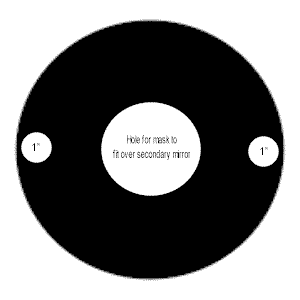
    hartman.gif (3937 bytes)

    This is simply a circular piece of cardboard cut to fit over the corrector plate of your SCT.   It has two 1 inch diameter holes cut out of it that are opposite each other and as close to the edge of the corrector plate as possible.  Place this card over the corrector plate and take another image of the bright star.  If the camera is accurately focused you will see one image of the star.  If the camera is not quite focused yet you will see two images of the star.  The further the images are apart, the more out of focus the camera is.  To achieve perfect focus simply  make small adjustments to the focus and take new images until the two star images converge into one. 

  5. Now that the camera is focused, rotate the flip finder mirror to the 45 degree angle and adjust the position of the eyepiece in the finder until a crisp image of the bright star appears.  The finder eyepiece is now truly parfocal with the camera and can now be used to find and centre objects for imaging.

The process above works extremely well when my CCD camera is at the prime focus of the LX10 or LX200.   Focusing the MX5 when attached to my Lumicon 80mm Superfinder   required a slightly different approach as I could not achieve camera focus with the flip mirror attached.  This meant I could not get a rough initial focus as described in step 1.   The first time I tried to use the MX5 with the Superfinder I just could not seem to get any image no matter how I adjusted the helical focuser on the superfinder.    I concluded that what I needed was an eyepiece that was parfocal with the MX5 CCD chip when the MX5 was fully inserted in the diagonal/extension tube.  With such an eyepiece I could adjust the helical focuser until I saw a focused image.  Then I could simply replace the eyepiece with the MX5 and be very close to perfect focus.  I could then use steps 3 and 4 above to achieve a perfect focus.

So the question was how to get an eyepiece parfocal with the CCD chip on the MX5.   The CCD chip on the MX5 is approximately 17.5mm from the end of the barrel.   Therefore an eyepiece should be roughly parfocal with the MX5 when it is 17.5mm from being fully inserted in the eyepiece holder.  Using this information it is possible to create an eyepiece that is parfocal with the MX5 CCD chip using the following procedure:

  1. Place an eyepiece in the diagonal of the LX10/LX200 such that it is roughly 17.5mm from being fully inserted into the eyepiece holder.
  2. Focus the LX10/ LX200 and centre it on a bright star.
  3. Replace the eyepiece with the MX5.  Make sure that the MX5 is fully inserted in the diagonal eyepiece holder.
  4. Take an image.  You should see the doughnnut described in step  3 above.
  5. Perfectly focus the MX5 using the Hartman mask technique described in step 3 and 4 above.
  6. Remove the MX5 from the diagonal
  7. Insert the eyepiece into the diagonal and observe the image as you slide it down towards full insertion.  Due to the Hartman mask you should see two images of the bright star gradually come together to form a single star image. At this point the eyepiece is focused, so secure it in the diagonal.
  8. Make a mark on the eyepiece at the point it enters the eyepiece holder of the diagonal.

I was now able to achieve an approximate focus for the MX5 in the Superfinder using the following procedure:

  1. Insert the eyepiece into the Superfinder diagonal/eyepiece extension tube until the mark made at step 8 above is just visible above the rim of the eyepiece holder.
  2. Adjust the helical focuser on the Superfinder until a sharp image is obtained in the eyepiece.
  3. Replace the eyepiece with the MX5.   Make sure that the MX5 is fully inserted into the diagonal/extension tube eyepiece holder.

I have now taken several CCD images using the Superfinder.   When using the Hartman mask to finish the accurate focus for a monochrome image I noticed that the I was seeing four star images rather than two.  By slightly adjusting the helical focusser I could get these four images to converge to form three images and then further converge to form two.   As hard as I tried I could not get the two images to converge into a single star image.  Even so, the finder still produced reasonable monochrome images although the stars did look slightly fuzzy. Then I took my first RGB image through the finder.  Unlike focusing through the LX10/LX200 I noticed that I had to refocus the camera each time I changed the colour filter.  Also, when focusing the camera through a colour filter, the Hartman mask produced the normal two star images that converged nicely  into one when the camera was focused.  I then realised what was happening with the monochrome image.  The Lumicon Superfinder suffers from chromatic aberration.  This is a condition where the objective lens brings light of different wavelengths to a focus at different distances from the lens.  This explains why I had to refocus the camera for each colour filter.  The Superfinder objective lens appears to focus the green and blue components of a light ray at the same distance from the lens but the red component is focused slightly further away.  This explains the fuziness of the stars in the monochrome image.  My best monochrome images were obtained when the Hartman mask showed only two star images.  This would have happened when the camera was midway between the focal point of the blue/green component and the red component (i.e. the components were slightly out of focus by equal amounts).  There is nothing that can be done about chromatic aberration.  I have resolved to just take RGB images with the Superfinder from now on.